
Convert PNG, JPG, or WebP in bulk. Fast, private, and mathematically precise.
Drop PNG, JPG, or WebP files here or Browse
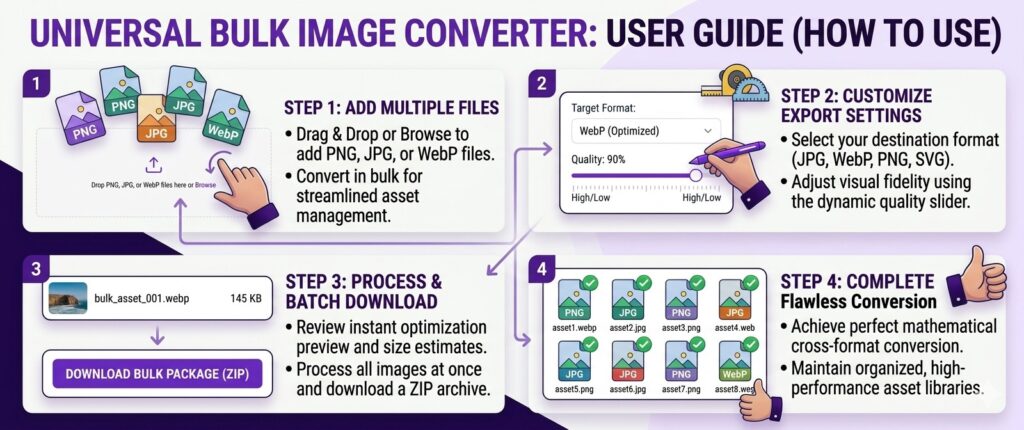
In the digital age, data privacy is no longer optional. Most online utilities require you to send your images to their cloud servers, where they may be stored or analyzed. Our Bulk PNG to JPG Converter operates on a “Zero-Server” architecture. By utilizing the power of your browser’s internal engine, your images stay on your device throughout the entire transformation process. This is the professional standard for designers working on sensitive Premium UI Components or internal corporate projects.
Beyond security, speed is the secondary pillar of our tool. Traditional converters are limited by your upload speed; if you have 50 high-resolution PNGs, you could be waiting minutes just to start the process. Our Bulk PNG to JPG Converter bypasses the internet entirely for the conversion phase, utilizing your RAM and CPU for near-instant results.
Google’s ranking algorithms in 2026 place a heavy emphasis on page speed. One of the biggest “score killers” is the use of unoptimized PNG files where a JPEG or WebP would be more efficient. Our Bulk PNG to JPG Converter helps you solve this instantly. By batch-converting your heavy lossless files into optimized JPEGs, you can reduce the initial payload of your website by up to 80%.
This optimization is especially critical for a Figma dashboard template where multiple screenshots and preview images are loaded simultaneously. Smaller image files mean a lower Largest Contentful Paint (LCP) score, directly pushing your site higher in the Search Engine Results Pages (SERPs).
The Bulk PNG to JPG Converter handles the complex task of “flattening” images. Since PNGs support transparency (alpha channels) and JPEGs do not, our converter automatically applies a mathematically pure white background to any transparent areas. This prevents the “black box” effect seen in lower-quality converters. Furthermore, our engine uses advanced interpolation algorithms to ensure that text and fine lines—critical in UI design—remain sharp even after compression.
For designers who need even more modern formats, we also support WebP export. WebP is the successor to both PNG and JPG, offering transparency support with even smaller file sizes. By using the Bulk PNG to JPG Converter to transition your library to WebP, you are future-proofing your assets for the modern web standards of 2026 and beyond.