How to use it in Figma, even if you have never used Figma
Four steps. You do not need to draw anything, and a free Figma account is enough.
Fill
Export
- Press Copy to FigmaClick the button on this page. The design is copied, like text you copy with Ctrl + C.
- Paste it in FigmaOpen Figma, open any file and press Ctrl + V (Cmd + V on Mac). You get real, editable layers.
- Make it yoursDouble-click a text to type your own words. Click a shape and change its color under Fill. Drag your own photo onto an image box.
- Export itClick the design. In the right panel, scroll to Export, choose PNG, JPG, SVG or PDF, then click Export.
Tip: install the free Google Fonts used in the design (the name shows when you click a text) so the text looks the same on your computer.
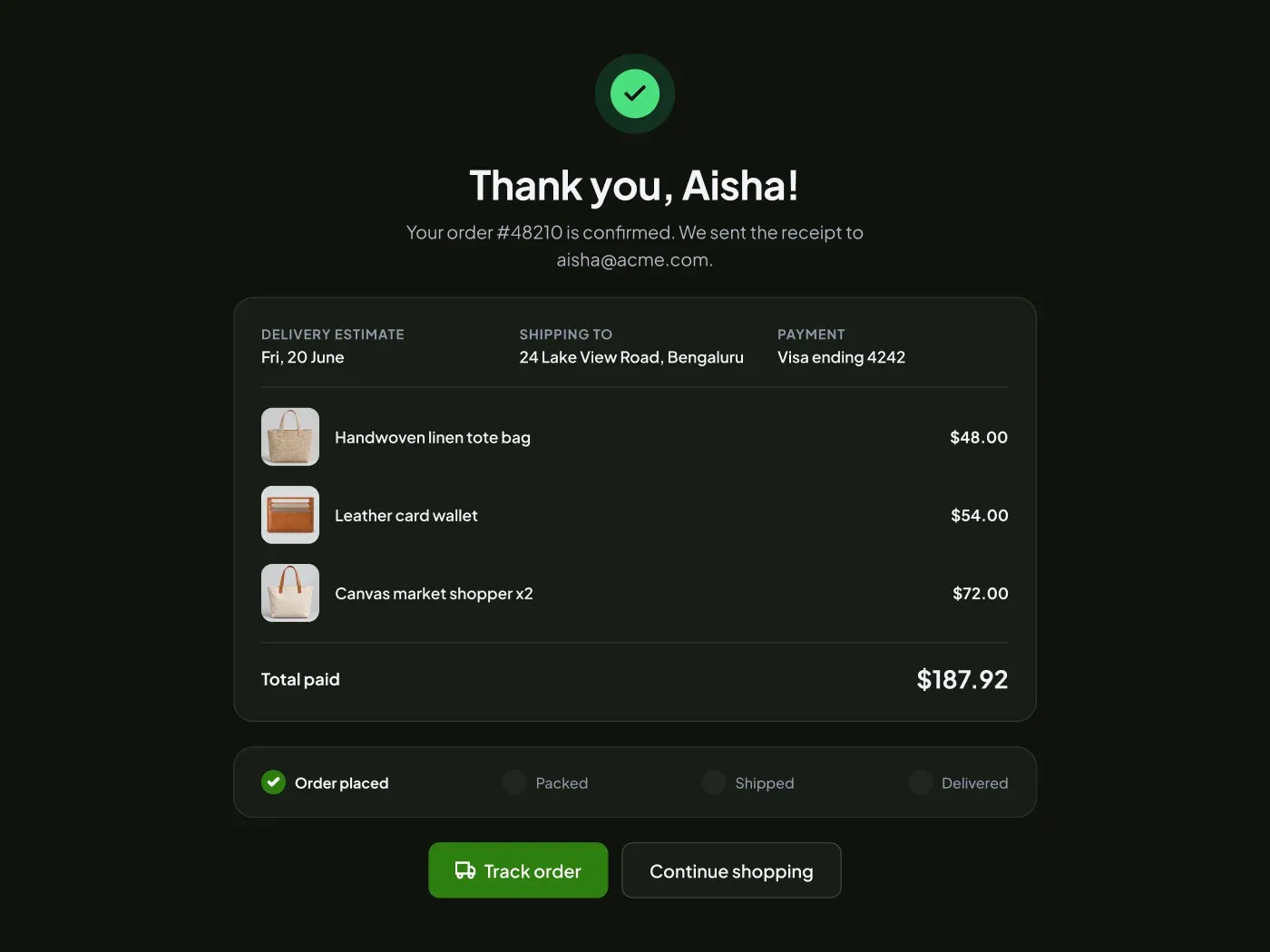
The dark order confirmation page comes with a soft charcoal page and bright accents. Reassure buyers right after they pay. This order confirmation page has a clear success message and every detail of the order. The dark version keeps the success state calm and clear.
What is included
- A success icon and thank you message
- Delivery date, address and payment
- The item list with a total paid
- A progress bar and two buttons
Where to use it
Use it as the thank you page of a store or a booking flow. Replace the details.
Design notes
The success icon is a 72 px circle with a 44 px check inside. The details card is 720 px wide with the delivery date, address and payment in three columns, then the item list and the total. The progress bar has four steps, and the first one is marked as done.
This dark version uses an accent of #2d7f10 on a page of #10130e, with cards in #181d16 and a soft accent fill of #2b4021. The light version of this design is a separate listing: Order Confirmation Page UI for Figma.
Questions
How do I show a later delivery status?
Mark more steps as done by copying the filled circle with the check to the next steps, and change their text weight to Bold.
Can I add a recommended products row?
Yes. Add a row below the buttons with three product cards from the Product list design in this library.
Is there a light version?
Yes. Order Confirmation Page UI for Figma has the same layout on a light page.
How to use it
Copy the component with the copy button and paste it into Figma with Ctrl+V or Cmd+V. The text uses Plus Jakarta Sans, which is free on Google Fonts.