How to use it in Figma, even if you have never used Figma
Four steps. You do not need to draw anything, and a free Figma account is enough (Pro components need a ProFigma Pro plan).
Fill
Export
- Press Copy to FigmaClick the button on this page. The design is copied, like text you copy with Ctrl + C.
- Paste it in FigmaOpen Figma, open any file and press Ctrl + V (Cmd + V on Mac). You get real, editable layers.
- Make it yoursDouble-click a text to type your own words. Click a shape and change its color under Fill. Drag your own photo onto an image box.
- Export itClick the design. In the right panel, scroll to Export, choose PNG, JPG, SVG or PDF, then click Export.
Tip: install the free Google Fonts used in the design (the name shows when you click a text) so the text looks the same on your computer.
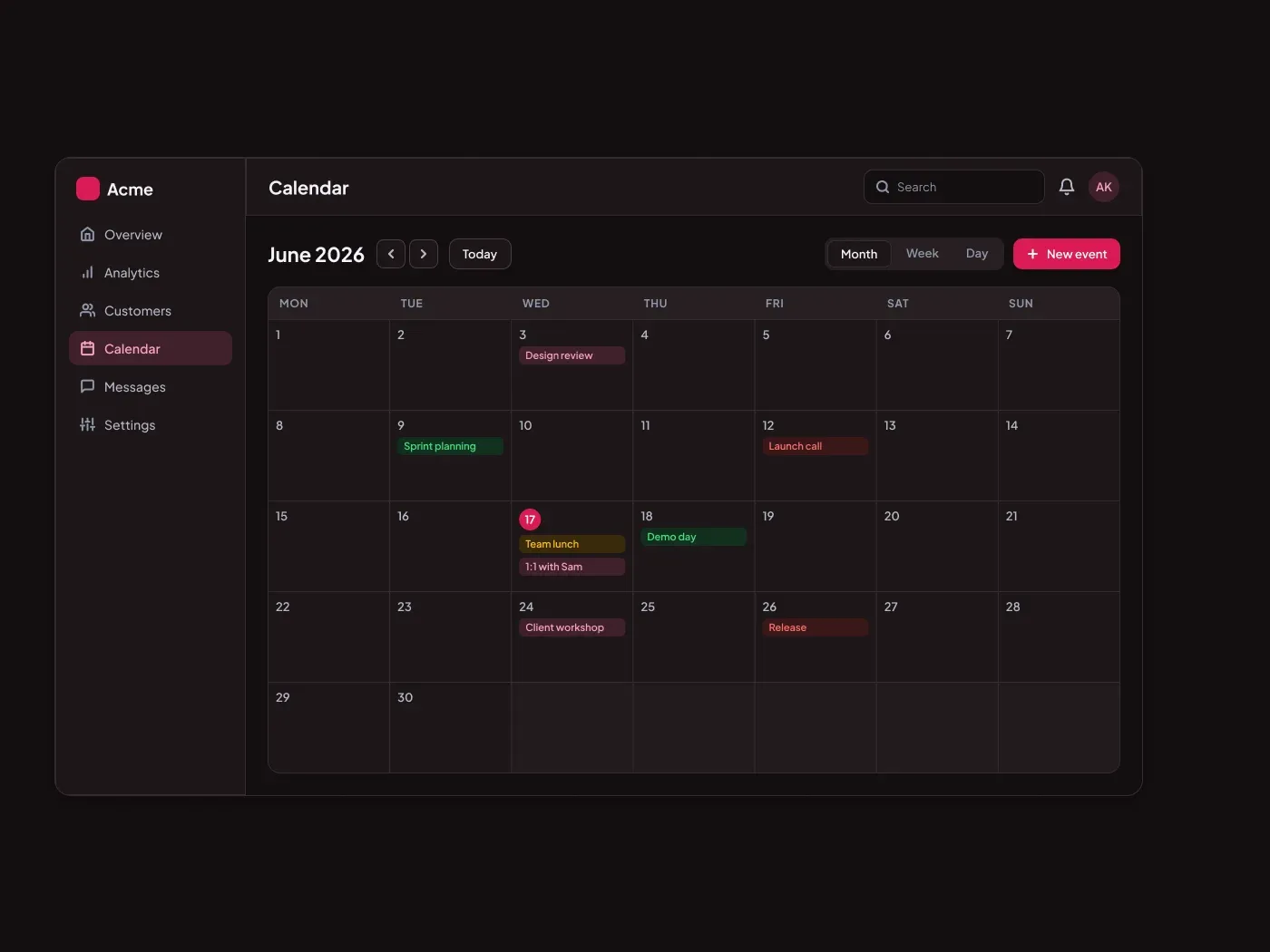
The dark calendar view comes with a soft charcoal page and bright accents. Plan the month at a glance. This calendar view has a full month grid with colored event chips and a clear marker for today. The dark version keeps event colors easy to tell apart.
What is included
- A month grid with weekday headers
- Event chips in four colors
- A today marker
- A view switch and a new event button
Where to use it
Use it in a scheduling tool, a team planner or a booking app. Move the events and change the month.
Design notes
The month grid has seven equal columns with 100 px tall cells. Event chips are 11 px with a 6 px radius, the today marker is a 24 px circle, and the weekday row uses 12 px uppercase text. The view switch has three options, and Month is the selected one.
This dark version uses an accent of #da1b54 on a page of #130e10, with cards in #1d1618 and a soft accent fill of #40212b. The light version of this design is a separate listing: Premium Calendar View UI for Figma.
Questions
How do I change the month?
Change the title and the day numbers. Each cell is a frame with the date as text, and empty cells are the last two in the final row.
Can I show a Week view?
The Week and Day options are drawn, but not built as separate screens. Duplicate the frame, delete four of the five rows, and make the cells taller.
Is there a light version?
Yes. Premium Calendar View UI for Figma has the same layout on a light page.
How to use it
Copy the component with the copy button and paste it into Figma with Ctrl+V or Cmd+V. The text uses Plus Jakarta Sans, which is free on Google Fonts.