How to use it in Figma, even if you have never used Figma
Four steps. You do not need to draw anything, and a free Figma account is enough (Pro components need a ProFigma Pro plan).
Fill
Export
- Press Copy to FigmaClick the button on this page. The design is copied, like text you copy with Ctrl + C.
- Paste it in FigmaOpen Figma, open any file and press Ctrl + V (Cmd + V on Mac). You get real, editable layers.
- Make it yoursDouble-click a text to type your own words. Click a shape and change its color under Fill. Drag your own photo onto an image box.
- Export itClick the design. In the right panel, scroll to Export, choose PNG, JPG, SVG or PDF, then click Export.
Tip: install the free Google Fonts used in the design (the name shows when you click a text) so the text looks the same on your computer.
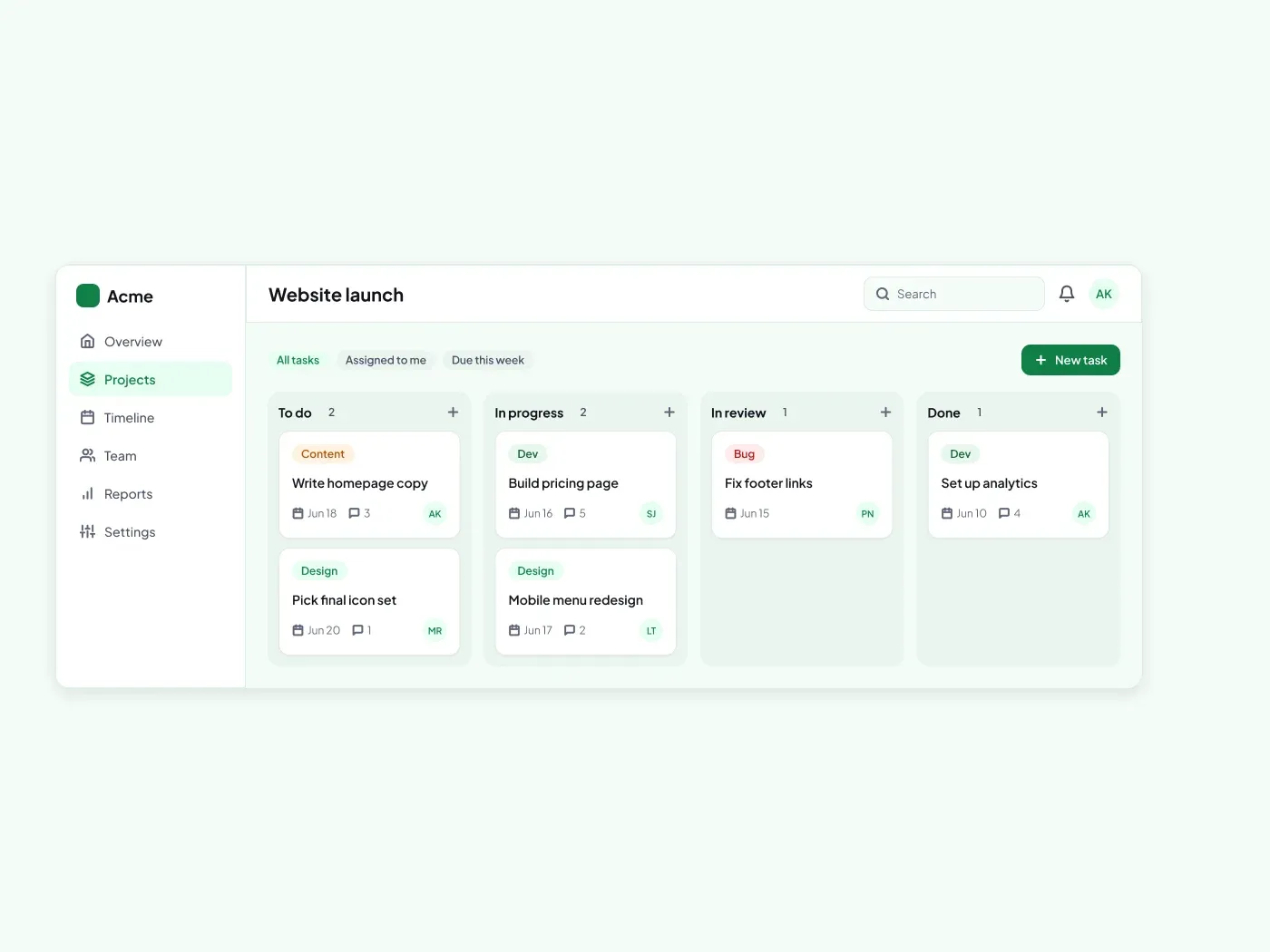
Show work moving from idea to done. This kanban board has four columns and task cards that carry the details people need.
What is included
- Four columns: To do, In progress, In review, Done
- Task cards with colored labels
- Due date, comments and owner on every card
- A toolbar with filters and a new task button
Where to use it
Use it for a project tool, a content plan or a team tracker. Rename the columns and edit the cards.
Design notes
Four columns share the board with a 14 px gap. Task cards have a 12 px radius, 14 px padding and a label badge in one of four colors. Each card shows a due date, a comment count and a 26 px owner avatar. The toolbar above has filter badges and a New task button.
This light version uses an accent of #107f47 on a page of #f4fbf7, with white cards. A dark version of this design is a separate listing: Premium Dark Kanban Board UI for Figma.
Questions
How do I add a label color?
Duplicate a label badge and change its fill and text color. Keep the text contrast high, and use the same shape as the other labels.
Can I show a card as overdue?
Yes. Change the due date text to the red status color and add a small clock icon in front of it.
Is there a dark version?
Yes. Premium Dark Kanban Board UI for Figma has the same layout on a soft charcoal page, with the same accent color.
How to use it
Copy the component with the copy button and paste it into Figma with Ctrl+V or Cmd+V. The text uses Plus Jakarta Sans, which is free on Google Fonts.