
How to use it in Figma, even if you have never used Figma
Four steps. You do not need to draw anything, and a free Figma account is enough (Pro components need a ProFigma Pro plan).
Fill
Export
- Press Copy to FigmaClick the button on this page. The design is copied, like text you copy with Ctrl + C.
- Paste it in FigmaOpen Figma, open any file and press Ctrl + V (Cmd + V on Mac). You get real, editable layers.
- Make it yoursDouble-click a text to type your own words. Click a shape and change its color under Fill. Drag your own photo onto an image box.
- Export itClick the design. In the right panel, scroll to Export, choose PNG, JPG, SVG or PDF, then click Export.
Tip: install the free Google Fonts used in the design (the name shows when you click a text) so the text looks the same on your computer.
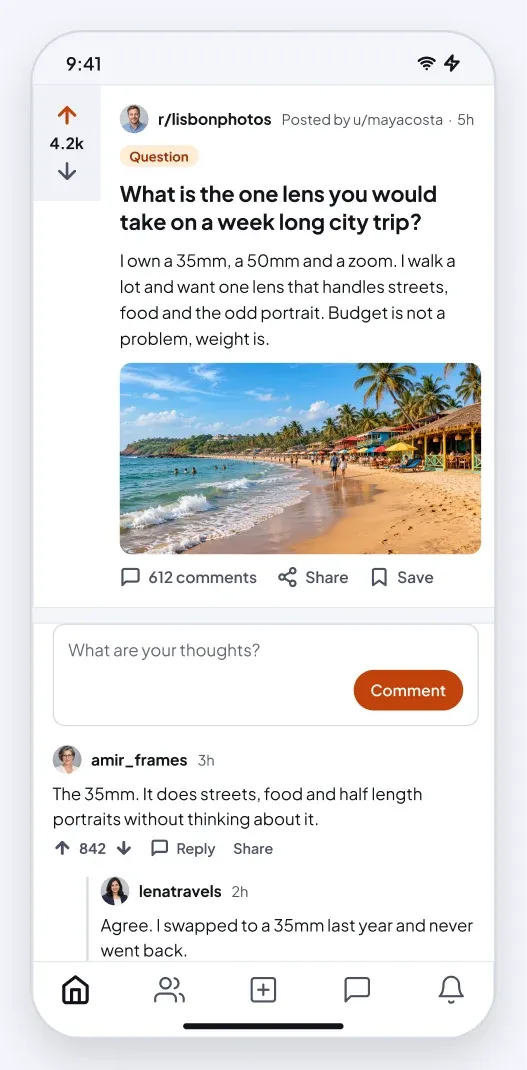
This social forum thread app UI for Figma gives you a forum thread with a voted post, a comment box and nested replies.
What is included
- A vote column with up and down arrows and a score
- A post with community, author, a flair tag, title, text and a photo
- Comments, Share and Save actions
- A comment box with a Comment button
- Nested comments with a left line and vote counts
- The app screen is 390 by 844 px with a status bar, a home indicator and a tab bar where the screen has one
Where to use it
Use it for forums, Q and A sites, community boards and discussion tools. It is made for iOS and Android app UI.
Design notes
Nested replies use an indent and a thin vertical line, up to three levels. A side card shows community info and rules on the web layout. It uses a light theme: white and near-white cards, dark text and a orange accent, so it reads like a real app screen rather than a wireframe.
Built for editing
Spacing follows a 4 point scale and layers have clear names, so developers can find what they need. Every color is a fill you can change in the fill panel, and the whole screen uses auto layout. Text pairs stay above 4.5 to 1 contrast, except white text that sits on a photo.
How to use it
Copy the component with the copy button and paste it into Figma with Ctrl+V or Cmd+V. This is the Light version. Photo spots are rectangles with a real sample picture already placed as a fill, so you can swap in your own picture in one click. Install the free Plus Jakarta Sans font first. All names, handles and numbers are sample content.