UX Design Patterns: Complete Guide for Senior Designers
· 9 min read · by the ProFigma team
UX design patterns are proven solutions to problems that appear in almost every product, such as how people navigate, search, fill in forms and recover from errors. This guide explains ten patterns every designer should know, when to use each and the mistakes that make them confusing. Apply them as starting points, then test them with real users.
Key takeaways
- A pattern is a solution to a recurring problem; a component is one interface element that a pattern may use.
- Familiar patterns reduce learning, which is their main benefit.
- Always adapt a pattern to your users and content instead of copying it blindly.
- Accessibility is part of the pattern: labels, focus, contrast and clear errors.
- Test with real people, because a pattern that works elsewhere may fail in your context.
Pattern vs component vs design system: how they relate
These three terms are often mixed up, so it helps to separate them.
- Component: a reusable interface element, such as a button, input field or card.
- Pattern: a proven way of solving a user problem, usually combining several components. A login flow is a pattern made of inputs, a button, links and error messages.
- Design system: the shared collection of components, styles and rules that a team uses to build patterns consistently.
In practice, you start with the problem (the user needs to find something), pick a pattern (search with suggestions), build it with components and keep it consistent through the design system.
Ten UX design patterns every designer should know
Each pattern below covers the problem it solves, when to use it and the mistake to avoid. Use the table for a quick overview.
| Pattern | Problem it solves | Example screen |
|---|---|---|
| Navigation | Where am I and where can I go? | Top navbar, tab bar |
| Search | I know what I want | Search field with suggestions |
| Forms | I need to give information | Login, sign-up, checkout |
| Cards | Show many items at a glance | Product grid |
| Modals | Ask for a focused decision | Confirm delete dialog |
| Filters and sorting | Narrow a long list | Product listing |
| Empty states | There is nothing here yet | New inbox, no results |
| Onboarding | Help new users start | First-run tips |
| Pagination or infinite scroll | Too many items to show at once | Search results |
| Feedback and errors | Did that work? | Toast, inline error |
1. Navigation
Navigation answers "where am I and where can I go". On websites, a top navigation bar with five to seven clear labels is the most familiar pattern. On mobile apps, a bottom tab bar with three to five destinations keeps key sections within thumb reach.
Mark the current location, and use plain labels rather than clever ones. Mistakes to avoid are hiding primary links behind a menu icon on desktop and adding too many items. A responsive navbar UI kit for Figma shows how desktop and mobile navigation can share one structure.
2. Search
Search suits products with many items, where browsing is slow. Place the field where users expect it, usually near the top, and make it large enough to see. Suggestions as users type, recent searches and helpful "no results" messages make it much more useful.
Avoid searching only exact matches, and avoid dead ends. If nothing matches, suggest alternatives or ways to adjust the search.
3. Forms
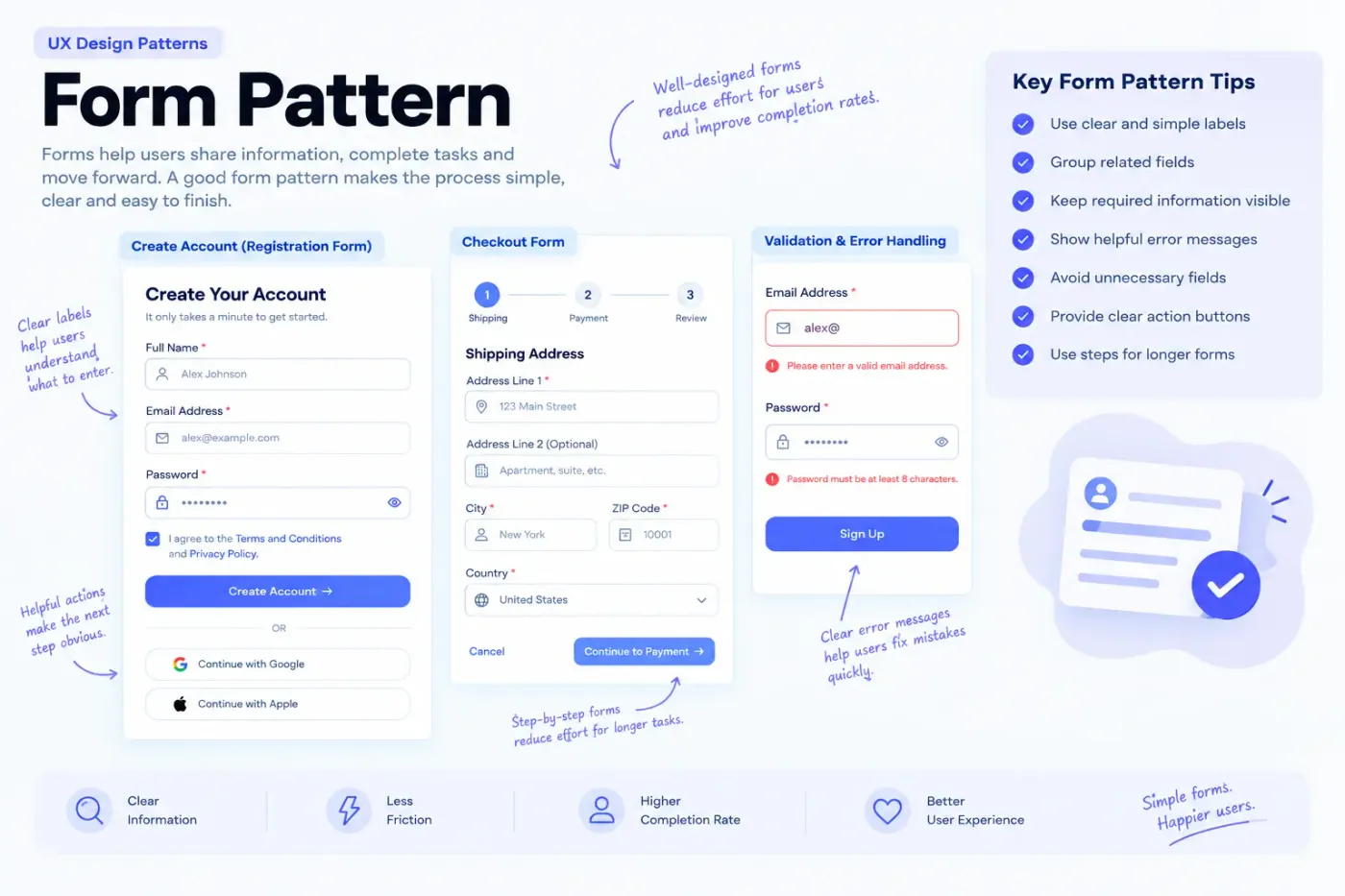
Forms are where users give you information, and where many drop off. Keep them short, ask only what you need and use clear labels above or beside fields, not placeholder text alone, since placeholders disappear when typing.
- Group related fields and keep one column when possible.
- Show requirements, such as password rules, before users make mistakes.
- Validate inline and explain how to fix each error.
- Make the primary action obvious.
For a worked example of the form pattern, study this login UI component for the form pattern, and the registration form UI for a longer flow.
4. Cards
Cards group an image, title and a few details into one scannable unit, which makes them effective for products, articles and profiles. A grid of cards lets people compare items quickly.
Keep card content consistent: same image ratio, same order of information, same actions. The mistake to avoid is overloading a card with too many details or competing buttons. See how it works in practice in an e-commerce product grid UI for the card pattern.
5. Modals
A modal dialog interrupts the screen to ask for a focused decision, such as confirming a deletion. Use it sparingly, only when the user must respond before continuing.
Make the title explain the decision, label buttons with actions ("Delete file", not "OK"), allow closing with Escape and a visible close button, and return focus to the element that opened it. Avoid stacking modals or using them for long forms.
6. Filters and sorting
Filters help users narrow a long list by attributes such as price, size or category, while sorting changes the order. Show active filters clearly, make them easy to remove and update results quickly.
On mobile, a filter sheet that opens from a button saves space. Avoid hiding the number of results or making users apply filters one at a time without feedback.
7. Empty states
An empty state appears when there is no content yet or no results. Instead of a blank page, explain what is missing and what to do next, with a clear action such as "Create your first project".
Keep the tone helpful and brief. A friendly illustration can help, but the message and action matter more.
8. Onboarding
Onboarding helps new users reach their first success. Use short tips, checklists or an empty state with guidance, and let users skip. Teach through doing rather than long tours.
Avoid showing everything at once. Introduce features when they become relevant.
9. Pagination or infinite scroll
When there are too many items to show, you either paginate or load more as the user scrolls. Pagination gives a sense of position and makes it easy to return to a spot; infinite scroll suits casual browsing but can make the footer unreachable and the position hard to recover.
A "Load more" button is a middle ground. Choose based on whether users browse or look for specific items.
10. Feedback and error messages
Users need to know that an action worked or failed. Use a short confirmation (a toast or inline message) for success, and explain errors in plain language with a way to fix them.
Place the message near the problem, do not rely on color alone and avoid blaming the user. "Enter an email like name@example.com" is better than "Invalid input".
Accessibility notes for forms, modals and error messages
Patterns are only useful if everyone can use them. A few checks go a long way.
- Labels: every input needs a visible label that is linked to the field in code.
- Focus: keyboard users must see where they are. Keep visible focus styles and a logical tab order.
- Contrast: normal text should reach a 4.5:1 ratio. Test pairs with the WCAG color contrast checker for accessible patterns.
- Errors: explain the problem in text and link it to the field, not only with a red border.
- Modals: trap focus inside while open and restore it on close.
The WCAG 2.2 quick reference lists the success criteria behind these checks. Then test with the keyboard alone and, if possible, with a screen reader.
How to practise UX design patterns
- Pick a common screen: login, checkout, search results or settings.
- Redesign it in Figma using the pattern as a base.
- Compare it with well-known products and note why each element sits where it does.
- Ask two or three people to try it and watch where they hesitate.
Conclusion
UX patterns give you reliable starting points so you spend your effort on what is unique about your product. Learn the problem each pattern solves, use accessible components and check your result with real users.
To see these patterns built from components you can reuse, browse the Figma components on ProFigma and rebuild a pattern or two in your own file.
FAQ
What are UX design patterns?
Reusable solutions to common usability problems, such as navigation, search, forms and error handling. They give users familiar behaviour so they understand a screen without learning it first.
Are UX design patterns the same as UI components?
No. A pattern is the solution to a problem, like a login flow. A component is a reusable interface element, like a button or input field. A pattern usually combines several components.
Should beginners learn UX design patterns?
Yes. Patterns give you a reliable starting point for common screens and help you explain design decisions. Learn the pattern first, then adapt it to your users and content.
Can patterns improve accessibility?
Yes, when applied well. Clear labels, visible focus, sufficient contrast and understandable error messages are part of many patterns. Test with keyboard and screen reader to confirm.
How do I practise UX design patterns?
Redesign common screens such as a login, checkout or search results page in Figma, compare with well-known products and note why each element is placed where it is.